
$0 Unlimited Mobile for new Ting Internet customers
Sign up for Ting Internet. Get unlimited mobile for $0.
Make the switch to Ting Internet and score a seriously sweet deal on mobile. New internet customers get free unlimited mobile.
What’s included
Our $0 Unlimited Plan is simple and stress-free:
- Unlimited talk, text and data —with no data caps or throttling
- Up to 5 lines on a single account
- $0/month. No credit card. No fees. Just easy, reliable mobile
- No international calling or roaming — U.S. coverage only
What you’ll need to get started
Getting started is easy. Here’s what you’ll need:
- A redemption code from a Ting door-to-door team member
- An unlocked, Ting-compatible phone.
- A Ting SIM card or an eSIM-capable device.
- Your current carrier’s account number and PIN (if you want to keep your number)
Activating your first line
Let’s get you set up! Follow these simple steps to start enjoying your $0 Unlimited Plan:
1. Get Started
Head over to https://tinginternet.com/freemobileoffer
- Create your account or sign in if you already have an account
- Enter your redemption code and click Check.

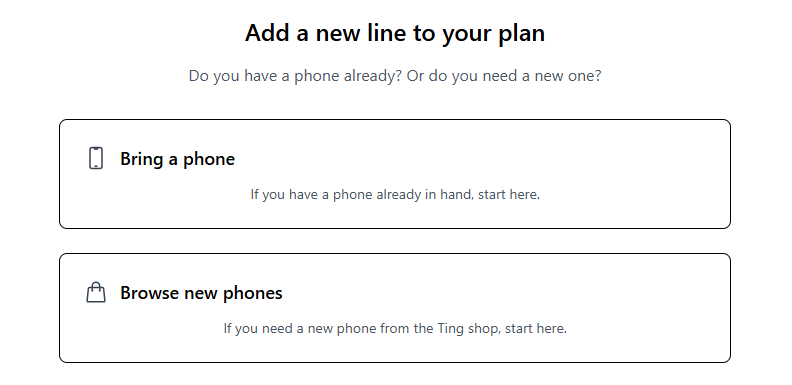
2. Select your device option
- Already have a phone? Select Bring a phone. Have it handy to check compatibility in the next step.
- Need to purchase a new phone? Select Browse new phones.
3. Check your phone’s compatibility
- Enter your phone’s IMEI if you're bringing a phone. Select Check.
- Need a hand? Find your IMEI.
- Need a hand? Find your IMEI.

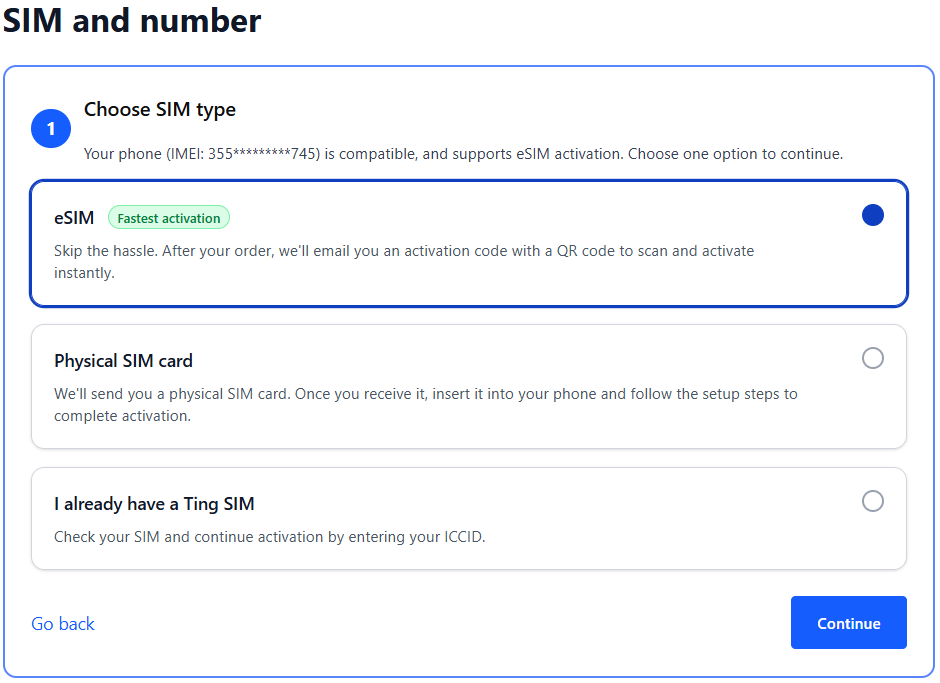
4. Get a SIM or check your SIM card
- If your phone is eSIM compatible, you can select the option for eSIM. We'll send you an email with the details after activation.
- If you prefer using a physical SIM:
- Select Physical SIM card to order a new SIM. We'll mail it to you.
- Already have a Ting SIM? Select I already have a Ting SIM. We'll ask for the SIM number in the next step.
5. Verify coverage
- Enter your home address to confirm Ting service is available in your area. Select Continue to plan selection.

6. Select your number option
- Have a number you want to transfer to Ting? Select Keep my number.
- Enter your current phone number.
- Looking for a new number? Select Get a new number.
- Select your area code.

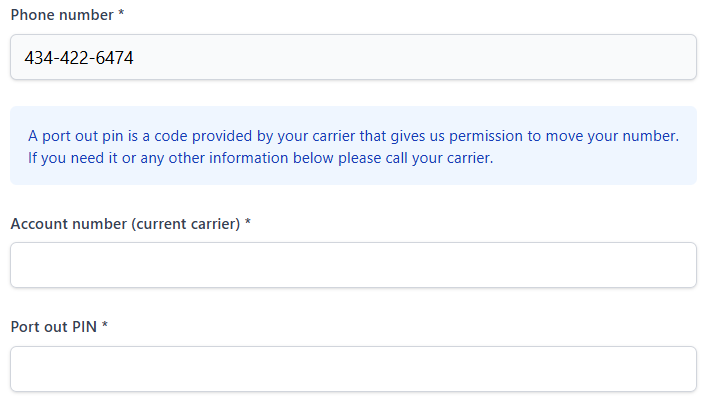
7. Enter your porting information
- Provide your account name, account number, porting PIN, and address from your current carrier.
- When the form is complete, click Continue.
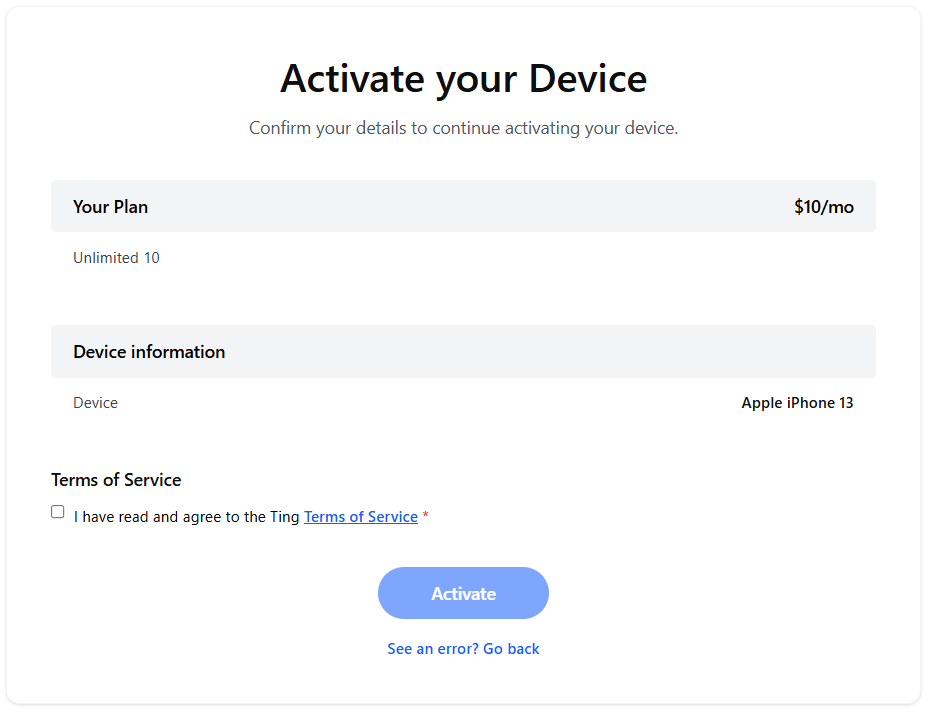
8. Review and confirm
- Double-check your details, agree to the terms of service and click Activate.
- If you opted for a new number, you'll be activated right away.
- If you chose to bring your number, we'll start the transfer process.
- If any of your details need to be changed, select See an error? Go back.
9. Complete your eSIM activation (if applicable)
- If you’re activating with eSIM, wait until your port completes. You'll get an email from us when it's ready to go.
- In some cases, your phone may automatically download your eSIM.
- If you don't see the automatic download, complete your eSIM activation by scanning the code and follow the prompts to finish activation.
Activating additional lines
Follow these simple steps to start adding lines to your $0 Unlimited Plan:
1. Start your new activation
- Log in to your Ting Mobile account.
- Head to device settings in the left-hand menu.
- Select Activate a device.

2. Select your device option
- Already have a phone? Select Bring a phone. Have it handy to check compatibility in the next step.
- Need to purchase a new phone? Select Browse new phones.
3. Check your phone’s compatibility
- Enter your phone’s IMEI if you're bringing a phone. Select Check.
- Need a hand? Find your IMEI.
- Need a hand? Find your IMEI.
4. Get a SIM or check your SIM card
- If your phone is eSIM compatible, you can select the option for eSIM. We'll send you an email with the details after activation.
- If you prefer using a physical SIM:
- Select Physical SIM card to order a new SIM. We'll mail it to you.
- Already have a Ting SIM? Select I already have a Ting SIM. We'll ask for the SIM number in the next step.
5. Verify coverage
- Enter your home address to confirm Ting service is available in your area. Select Continue to plan selection.
6. Select your number option
- Have a number you want to transfer to Ting? Select Keep my number.
- Enter your current phone number.
- Looking for a new number? Select Get a new number.
- Select your area code.
7. Enter your porting information
- Provide your account name, account number, porting PIN, and address from your current carrier.
- When the form is complete, click Continue.
8. Review and confirm
- Double-check your details, agree to the terms of service and click Activate.
- If you opted for a new number, you'll be activated right away.
- If you chose to bring your number, we'll start the transfer process.
- If any of your details need to be changed, select See an error? Go back.
9. Complete your eSIM activation (if applicable)
- If you’re activating with eSIM, wait until your port completes. You'll get an email from us when it's ready to go.
- In some cases, your phone may automatically download your eSIM.
- If you don't see the automatic download, complete your eSIM activation by scanning the code and follow the prompts to finish activation.
Already on Ting Mobile?
If you're already with Ting and you've got a redemption code, you’re eligible to switch to a new plan! Here's how to make the change. Just a heads up: your new plan won’t kick in until the start of your next billing cycle.
1. Have your redemption code ready, then head to https://tinginternet.com/freemobileoffer.
2. Log in to your existing Ting Mobile account.
3. Enter your redemption code. Select Check.
4. You’ll see the option to switch to the $0/month unlimited plan. Select Yes to confirm.
5. That’s it! You’ll see a success message once the change goes through. Your new plan will start with your next billing cycle.
Options for traveling outside Ting’s coverage
Use a local carrier SIM card
For long-term trips or heavy phone usage, a local SIM card can save you money and avoid unexpected charges. Here's how:
- Purchase a SIM card from a local carrier.
- Remove your Ting SIM card and store it safely.
- Insert the local SIM into your phone.
What to consider:
- Coverage areas for the SIM card.
- Domestic and international roaming policies (e.g., for multi-country trips).
- Rates for local and international calls.
When you return, simply swap your Ting SIM card back into your phone to resume service.
Use a local carrier eSIM
If you're traveling to a country with a local carrier that supports eSIM, adding another eSIM to your device is a great option.
- Purchase a plan from a local carrier with eSIM support.
- Switch eSIM profiles on your device seamlessly.
- When you're back, cancel the local SIM and switch back to your Ting eSIM profile.
What to consider:
- Coverage areas for the local SIM.
- Domestic and international roaming policies (especially for multi-country trips).
- Rates for local and international calls.
Switching your eSIM profile
iPhone
- Open Settings.
- Tap Cellular.
- Switch the eSIM profile under Carrier.
Android
- Open your device Settings.
- Tap Connections.
- Select SIM Manager.
Prepaid phones
A prepaid phone is a great option for countries outside Ting’s coverage. These phones are inexpensive and can be loaded with credit as needed.
Benefits of prepaid phones:
- Reliable for longer trips.
- Predictable rates with no surprises.
- Easy setup with a new local number.
What to consider:
- Coverage areas.
- Roaming policies for multi-country travel.
- Local and international rates.
Staying connected with VoIP services
Apps like Skype, WhatsApp, Viber, and FaceTime are excellent alternatives for calling and texting while traveling. They use Wi-Fi or mobile data to connect you with family and friends.
FAQ
How do I get a redemption code?
Your Ting representative will provide you a redemption code once you sign up for internet. If you believe you’re eligible and haven’t received a code, please contact your Ting rep.
When is the promotion ending?
The promotion has no current end date. When the promotion ends, we will provide 30-days notice before any changes are made to your account. You won't be cut off and you won't lose your mobile service. If you no longer want to stay with Ting, you can switch to a new provider.
How do I switch to another carrier?
When you are ready to switch carriers, you'll need your Ting account number and PIN to provide your new carrier. You can get this information from your Ting account.

.svg)
.svg)