Help center
Contact Us
Help center
Contact Us

Help Center - Internet

Account and Billing

Updating your Ting Account details
Other Articles in this Section
Ting Internet Billing Overview
Ting Infrastructure Tax Passthrough
Adding or Updating a Payment Method on your Internet Account
Canceling your Ting Internet Service
Setting up ACH on your Internet account
Simply Bits Billing Improvement FAQ
Important information about your $9 Ting preorder refund - FAQ
Ting Internet Billing Improvements FAQ
Updating your Ting Internet Account Password and Security Options
Returning your Ting Internet Equipment
Viewing your Ting Internet Bill and History

Updating your Ting Account details

In this article
Updating your details

Need to change the name, email, or phone number on your Ting account? No problem–updating your account details is quick and easy.

Updating your details

1. Log in to your Ting account.

2. Click My account in the top-right corner.

3. Select Account Settings.
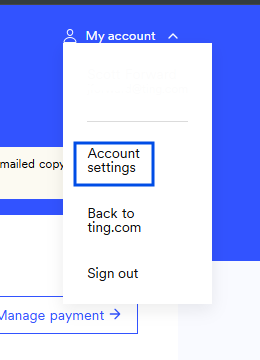
4. Under Account details, update your name, email, or phone number.
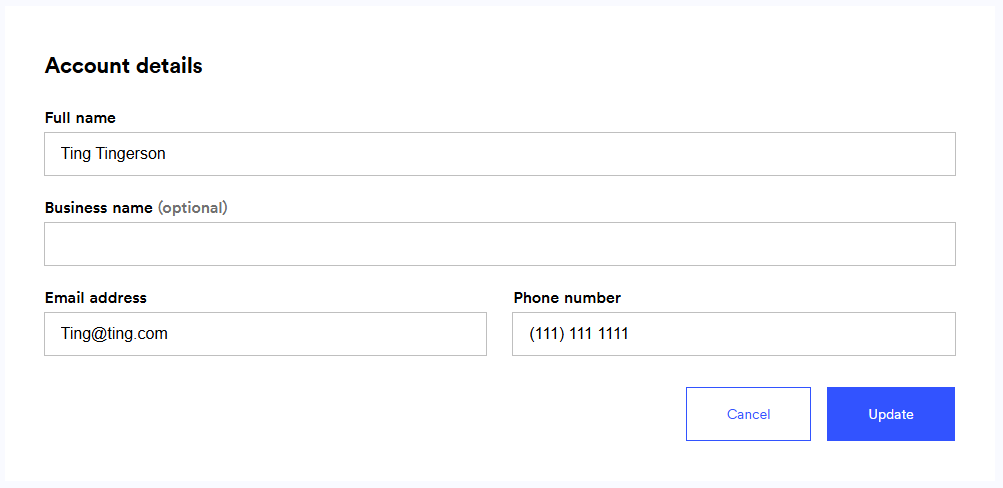
5. Click Update to save your changes.

Other Articles in this Section
Ting Internet Billing Overview
Ting Infrastructure Tax Passthrough
Adding or Updating a Payment Method on your Internet Account
Canceling your Ting Internet Service
Setting up ACH on your Internet account
Simply Bits Billing Improvement FAQ
Important information about your $9 Ting preorder refund - FAQ
Ting Internet Billing Improvements FAQ
Updating your Ting Internet Account Password and Security Options
Returning your Ting Internet Equipment
Viewing your Ting Internet Bill and History
  • Ting Internet
  • Ting Internet Status
  • Ting Mobile
  • Privacy
  • Terms